Thursday, May 23, 2013

Shift Key Problem


Some time ago I had trouble in my notebook. Some keys do not work properly. Incidentally when I menngunakan windows 7 operating system, I thought this was definitely a virus. That could happen because for this notebook does not have any anti virus installed.

I have some anti virus download, especially free. Then started the experiment, anti virus installed complete with latest updates. After that do a scan with a very saturate. The result is very disappointing, fixed knob is not working as usual.

There's crazy ideas, one of which troubled push button button simultaneously while annotate. And the result: Press right shift key and the left shift key simultaneously for a few seconds, then work
Hopefully this can help you to share your experiences problems.
Read More

Thursday, January 17, 2013

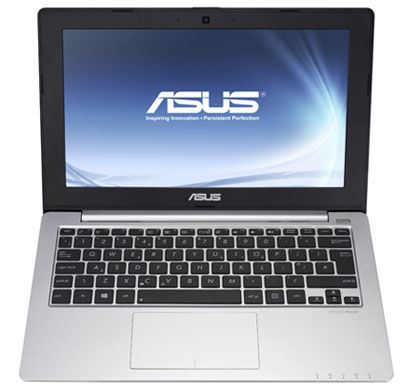
Asus X201E Ubuntu 12.04 ( Function Keys )

I recently bought asus notebook X201e some time ago. Since I am a fans of Ubuntu, I just installed Ubuntu LTS 12.04, I chose it because the support of the old and very easy to use. Once installed, there are several issues that arise are the function keys are not used. By doing the test a few pointers on google, finally I got the solution and it can work well.
The first step is to upgrade the kernel ubuntu 12.04 by default is 3.2 to 3.5 following is how: Add repositories of Ubuntu 12.10 by editing “/etc/apt/sources.list”
sudo vim /etc/apt/sources.list
and add following lines:
deb http://security.ubuntu.com/ubuntu quantal-security main universe restricted multiverse deb-src http://security.ubuntu.com/ubuntu quantal-security main universe restricted multiverse deb http://archive.ubuntu.com/ubuntu/ quantal-updates main universe restricted multiverse deb-src http://archive.ubuntu.com/ubuntu/ quantal-updates main universe restricted multiverse deb http://archive.ubuntu.com/ubuntu/ quantal main universe restricted multiverse deb-src http://archive.ubuntu.com/ubuntu/ quantal main universe restricted multiverse
Then update and install the kernel:

sudo apt-get update sudo apt-get install linux
For PAE kernel (for intel i386 with more than 4GB RAM) :

sudo apt-get install linux-generic-pae
After that reboot: sudo reboot. Yessss !!!! ..., successfully. The volume setting can walk normally again, as well as wireless and others. But the Fn key for brightness is still not running. After dabbling again, This could be fixed by editing the /etc/default/grub file and changing the line "GRUB_CMDLINE_LINUX_DEFAULT="quiet splash" to "GRUB_CMDLINE_LINUX_DEFAULT="quiet splash acpi_osi=". After running "sudo update-grub" in the terminal and rebooting, the keys were working again. And some functions in ASUS X201E worked. Good Luck Read More

Wednesday, October 17, 2012

FreeTDS MYSQL MSSQL PHP

You certainly know a wide range of database engine in the world. one of which is MYSQL.
My post this time about the experience of using the connector from MYSQL ubuntu server to MSSQL the course of microsoft. The goal is to read data from MSSQL database using PHP commands in a project I was working on. The first one is the installation of freetds package ubuntu package, by typing the command:
sudo apt-get install freetds-common freetds-bin unixodbc php5-sybase 
Once the process is complete, do the changes in the file freetds.conf use the command:
sudo vim /etc/freetds/freetds.conf then add some few lines at the bottom of the file: 
[yourserver] host = your.server.name 
port = 1433 
tds version = 8.0 
Furthermore restart the apache server on the machine by typing the command:
sudo /etc/init.d/apache2 restart 
The final step, create additional php file that is created as follows:
<? php
$ link = mssql_connect ('yourserver', 'yourusername', 'yourpassword');
if (!$link) { die ('Unable to connect!'); }  
if (!mssql_select_db ('yourdatabasename', $ link))
{ die ('Unable to select database'); }
$result = mssql_query ('SELECT * FROM yourtable');  
while ($row=mssql_fetch_array ($ result)) { var_dump ($ row); }  
mssql_free_result ($ result);
?>
Mysql database result has been able to read the data on MSSQL database. Furthermore, good luck, good luck
Read More

Wednesday, June 27, 2012

UBUNTU LTS 12.04 (Precise Pangolin)

Based on the Ubuntu Developer Summit in early September 2011 Canonical has announced the release of some new things related to Ubuntu LTS 12.04 

1. 64 Bit version for the default download. At 12. 04 Ubuntu main packages that can be downloaded is a 64 bit version. Nevertheless, the 32 bit version is still available as well. As the heart, it will use the Ubuntu 12.04 kernel version 3.2. (tested with my asus x201e)

2. Require DVD or USB drive to install. 12.04 Ubuntu seem to download this file image / ISO it will size around 750 MB. This means that with that much size will not fit if it is bundled on CD. Users will need a DVD or USB Drive to install it. Of course this is a shock to the user, especially with the addition of only 50 MB file only. 

3. Drop Banshee, Back to Rhythmbox Some reports suggested that the Banshee music player - which has just added to Ubuntu as the default music player - will be replaced again with Rhythmbox. The main problem in Banshee is the lack of software maintenance process / update the application and potentially not be compatible with ARM processors. It is still discussed in the mailing list Ubuntu-Desktop. 

4. No More Mono Framework Closely related to point (3) on the abolition of Banshee, Mono Framework is also possible to be eliminated from Ubuntu. Banshee is one of the few applications that still depend on Mono (another example is the Tomboy Notes and gBrainy), Mono is an implementation of Microsoft's. NET framework that is open source. According to the Ubuntu Community Manager Jono Bacon (written in his blog) that the Banshee and Mono problems have been fixed / finished. 

5. A much faster start up time for the Ubuntu Software Center The developers are hoping to improve the startup speed of the Ubuntu Software Center from 11 seconds to less than 2 seconds, and also continue to always make improvements Unity desktop. Ubuntu Software Center will be updated with support for multiple screenshots. 

6. Head-Up Display (HUD) Feature On January 2012, Mark Shuttleworth announced that Ubuntu will incorporate new features 12.04 of Head-Up Display (HUD), which will allow the search for an application menu item only via keyboard hotkey without the need for a mouse. Shuttlework added that HUD later on in the future will replace the Unity Applications menu. 

7. A Wayland Preview. 12.04 Ubuntu while still dependent on the primary server X.Org as a graphical display system, an experiment using Wayland Graphics System to run the X11 server and it allows the (successful). In the future maybe Ubuntu will adopt Waylang Graphics System as well. 8. Gnome 3.2 Gnome 3.4 plus some packages Most of the Gnome packages on Ubuntu LTS 12:04 it will use Gnome version 3.2 of the package, but some packages of Gnome version 3.4 will reportedly be included as well, for example GTK + 3.4, Gnome Games, gedit, gcalctool, Evince and Yelp.
Read More